












 There’s a lot of speculation about future iPods, and if they’ll play video – but you don’t need to wait, the latest version of podzilla (Linux for the iPod) plays video, and now video with sound. Here’s a quick HOW TO on installing podzilla and a video with sound playing on an iPod photo…
There are a few ways to do this, but here’s what I did – I installed podzilla from a Mac, so I used the “4G iPodLinux Installer 0.4” which can be downloaded from here.
The 4G iPodLinux Installer installs iPodLinux onto your 4th generation iPod, iPod photo, and iPod mini with no hassle.

Now, download the latest builds from iPodLinux.org http://ipodlinux.org/builds/
The two files I downloaded were:
http://ipodlinux.org/builds/2005-09-18-kernel.bin.gz
http://ipodlinux.org/builds/2005-09-18-podzilla.gz
Each file was decompressed, now control click / right click “4G iPodLinux Installer.app” and choose “Show package contents”.

Browse to the folder Contents/Resources/InstallationStuff/
Replace: 2005-08-23-kernel.bin and 2005-08-23-podzilla
With the most recent builds, I renamed my the same name, seems that the naming might be specific.

Close the window and double click the 4G iPodLinux Installer.app.
Your iPod photo should appear in the list, if it does not you may need to make sure the iPod photo was Mac formated. To format iPod photo for Macs, just download the iPod updater from Apple and restore. http://www.apple.com/ipod/download/
Once podzilla is installed, I added a new folder while the iPod was still on my desktop called “video” and added two of the sample files from iPodlinux.
http://www.ipodlinux.org/videos/DivingIpodPhoto.tgz
http://watertastesgood.com/ipod/ant_ipod.zip

Remove the iPod from the cradle, press and hold the menu and center button at the same time. The iPod will reboot to Podzilla and using the file manager browse to the video directory and play the video.
Here’s the video! Click here to view.
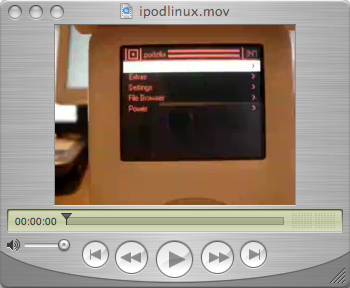
For more information, visit: http://ipodlinux.org/Video_Player
The iPodLinux page also has instructions for making your own videos, as well as installing from Windows. If you convert any videos, let us know.
40 thoughts on “HOW TO play video on iPods (with video)”
Comments are closed.

ADVERTISEMENT
Join Make: Community Today




It’s great how far this has gone. I’ve been the most popular kid at my school because all the other students want to know how to do this.
You don’t need the whole “show package contents” step — the 4G iPodLinux Installer actually has an option (available via the “Select an action” pull-down menu) that allows you to update podzilla and the kernel from the nightly builds you’ve downloaded.
Note, also, that nobody’s yet found a way to properly encode avis for the iPod photo under OS X… you have to use windows mencoder under Virtual PC. Gross.
But an iPod with video is wicked awesome.
WOW!! This works. I have my own website ww.gadgetsonthego.net and I wrote about your awesome instructions. Here’s a link:
http://www.gadgetsonthego.net/2005/09/ive-got-ipod-video.html
Thanks for making such easy to understand instructions. I am the first on my block with an iPod viDeo!!
WOW!! This works. I have my own website ww.gadgetsonthego.net and I wrote about your awesome instructions. Here’s a link:
http://www.gadgetsonthego.net/2005/09/ive-got-ipod-video.html
Thanks for making such easy to understand instructions. I am the first on my block with an iPod viDeo!!
I converted a full 174 megabyte family guy episode (divx) to this ipod format and it turned out to be 1.53GB haha works like a charm tho as long as i dont try to fast forward, rewind or pause although that is expected i cant wait til the player supports compressed files
I converted a full 174 megabyte family guy episode (divx) to this ipod format and it turned out to be 1.53GB haha works like a charm tho as long as i dont try to fast forward, rewind or pause although that is expected i cant wait til the player supports compressed files
hey i have followed these instructions ezactly and double checked them but as soon as my ipod turns on i just comes with a folder and ! mark what can i do
can i use this program for Windows? or is it just for macs?
I think flip4mac will do the job of converting .avi on OS X
I’ll try and report later
n
Can someone post instructions for converting video for playing on the ipod photo with sound. Software used, settings, etc. Thanks
I installed Podzilla with the builds listed above and i love the interface. but i have a problem it wont play the demo video.
i installed it on a windows step by step. I found something that does seem strange to me. in your video you go straight to file browser then to videos then to your file. with mine i have to go to file browser ipod-control then go back on the broswer and then and only then can i see the file. when i click it is just says – ‘No default action for this Filetype’ Help?
I’ve found something for the mac that will encode the right format for the videos…something to do with DivX mencoders…(I don’t understand all that stuff. But anyway, the software is at this website: a href=”http://homepage.mac.com/major4/” I hope I did that right…. The software page is at: a href=”http://homepage.mac.com/major4/download.html” Follow the instructions but, when the file is done being encoded, the extension will look like this: Video.avi.ff.avi. I deleted the ff.avi. part. Then it worked.
I found some software that works on OS X that encodes movies with any format extension mencoder thingyz. Here is the website:
http://homepage.mac.com/major4/
Here is the download page:
http://homepage.mac.com/major4/download.html
Hope it works-it did for mine!
It didn’t work for me, when I rebooted my ipod I got a folder with an exclamation mark that says http://www.apple.com/support/ipod below it. lukily I can fix that if I restore my ipod but I’m really disapointed that it won’t work.
I have an ipod nano. Does anyone know how to put videos on it? I also have windows. I’m willing to change my pc to mac if I can put video on my nano. Tanks for any help
Checkout my ipod nano pic at http://thegratisguide.blogspot.com
i tried to put linux onto my ipod mini and when i turn it on i get a folder with a little triangle and it restarts again if anyone has any idea what to do please tell me
i tried to put linux onto my ipod mini and when i turn it on i get a folder with a little triangle and it restarts again if anyone has any idea what to do please tell me
if you like ipod video, you should try to use PQ DVD to iPod Video Converter, that’s a good tool!
http://www.yaodownload.com/video-design/video/ipod-video-converter/
im sorry guys im not a nerd i just got an ipod nano and i dont know how im supposed to understand all this stuff im not into all the cumputer technickal mumbo and my computer is windows and i really want to know how to get linux on my ipod nano with out all this complicated stuff so is someonbe could help me out i would rally apreciate it my email is beanlr_3@hotmail.com someone please help me.
hey guys sorry but i dont know all the technickal mombo so if someone could help me out. Im trying to get the linux one my new i pod nano to watchvideos and play games and all the new stuff. but im just not good with it. My computer is windows xp but all this is to hard for me to understand so anyone that could help me out please do so it would be highly apretiated my email is beanlr_3@hotmail.com for any one that helps thank you.