












Bre brings in Matt Stinchcomb, the screenprinting expert of etsy.com, to the Weekend Projects podcast.
Have you ever wanted to create your own t-shirt designs? Look no further! Don’t forget to go and download the pdf to get all the details and supply lists. Warning: the end of this video is scary.
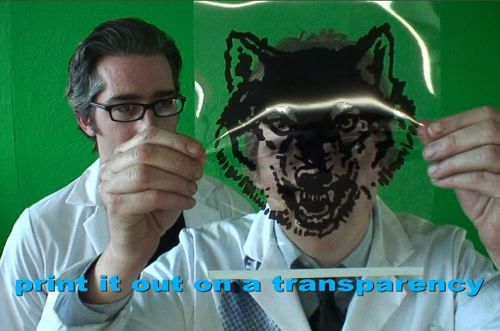
If you want to make a shirt just like ours, go ahead and download our source file and print it out on a transparency and you’re good to go. Since this is a crafty project, upload the photos of your awesome screen-printing creations to the Craft: flickr pool.
Get the podcast and pdf downloaded automatically in itunes. – Link
Update: Kirk will be demoing this at Maker Faire! – Link
Support the MAKE videos and visit our sponsor, Microchip!
58 thoughts on “Learn to Screen-Print Your Own T-Shirts – Make: Video Podcast”
Comments are closed.

ADVERTISEMENT
Join Make: Community Today




Awesome! I’ve always wanted to know how to do this. Thanks! Great video!
As for that microchip.com 16 bit contest – their site is totally vague about what exactly the contest is for. Evidentially you’re supposed to make something with their microchips by october 16, but what?
does anyone know or have a walkthrough on how to build one of the exposure boxes used in this video?
Brilliant presentation!
Thanks, that’s just what I needed to know. I’ve been meaning to do some screen printing and now I’ll give it a try. Very nice video. Cool touch with the LEDs as eyes.
Here’s a tutorial I did that doesn’t require a light box:
http://www.curbly.com/Chrisjob/posts/1169-Embrace-Photo-Silkscreen-Printing-for-under-75-
And here’s one that uses the sun:
http://www.instructables.com/id/EFAN6S16FTEQ2W3MOV/
Oh instead of transparencies I recommend using vellum actually stuff I personally use is a brand literally called “better than vellum” (Casey’s Translucency paper) throw in some super black (some call it laser buddy) to bring out the darks and its ready to burn!
Not bad, but that shirt just can’t compare to the wicked awesomeness of this.
what brand t-shirts did you use in making these shirts? they turned out brilliantly. :D
Thank you!!! It makes so much sense to see it in action rather than reading instructions. Very cool and striaght forward video.
this is a great walk through…
problem s, what if i wanted use more than one color?
Your post is nice.
Hello,
Your blog is beautiful i have also a blog writer and i write the following blogs.
http://beautifulbrazilforliving.blogspot.com
http://2shoppingcart.blogspot.com
http://pakistanihotels.blogspot.com
http://realestatepakistan.blogspot.com
http://send-gift-to-pakistan.blogspot.com
http://karachi-stock-market.blogspot.com
http://1indiatravel.blogspot.com
http://pakistan-travel.blogspot.com
I am senior most screen artist. I have a lot of experience in various fields of screen printing on different types of surfaces such as marble, acrylic sheet, plastic, steel, brass, and all types of cloths. I have a lot of experience also in the field of etching. You can learn marble etching, brass etching, steel etching, and several others. I can prepare a screen with several easy and difficult methods according to the quality requirements. I can make and teach nylon stamps, brass stamps of ancient style, and brass stamps of modern types. I can screen print even in four colors on each types of surfaces. I know several of the chemicals used in screen printing or etching. I can supply my prepared chemicals such as water proof for cloth screen. I can emboss on cloth, paper or card after printing it with screen. I know thousand of the tricks of this field such as transparent printing and making it colorful with Rambo. I know the compositions of compounds used in screen printing. I can make all the equipments related to this field. On the other hand I have a great skill to create and render videos lesson in my own voice. But have never tried to use this skill of computer generated ScreenCam videos for the purpose of screen lessons. I have created videos just for other purposes. But if someone ask me to create some specific videos for them, then I can do that for them against some little price. If some want to learn the chemicals of screen printing, etching, nylon stamp making, or some other else, then I am the best one person for him. Feel free to contact me. I am all time available for you all. Being a true professional I say just one thing. That I am the master key to open the door of screen or etching art. My email address is idrisazad@gmail.com.
HI SIR HOW R U MAIN APP SAY YE JANANA CHAHAT HU K SCREEN PER WO KON SAY CAMICAL LAGATAIN HAIN JIS K OPER TRACING HO JATI HAY OUR AS KI TRACING KISS PRINTER SAY NEKALTI HAY PLZ TELL ME
THANKS
This is very helpful, and im going to try to make a few t-shirts of my designs, but… i have one slight obstacle
what is a transparency? and how can you print on it?
Great presentation on getting started screen printing. Your videos are great.
i want to start t-shirt printing at home. where do i start first and what supplies and equipment do i need.
i want to start printing t- shirts at home. where do i start anad what supplies and equuipment will i need.
I work for Screen Printers Resource http://www.spresource.com, but have never actually seen a video like this. It was pretty cool.
Nice blog , i also got some good information from http://tshirtprince.com
Really nice T Shirt and video is great informative thanks for share it.
http://www.emanprinting.com/
Check out OC Print Pros – http://www.grcustomprinting.com
Located in Orange County, CA.
I ordered 300 shirts and there were done in 5 days.
Great prices and friendly service.
Ask for Rob
Thanks
Thanks for the tutorial! I want to make my own T-shirt. http://www.amerisleep.com
http://www.amerisleep.com
Yes,
I really want to create my own t-shirt designs, and your article is really very helpful for me, because I also interested for creating my own t-shirt designs, your article is so and very helpful for the people, who also desire for creating their won T-shirt Designs.
Thanks guys
There are some rules to sets it for a better result of the stuff’s work. You should make a count for the needs first, so you can set it up as their needs. china phones
que vuen video, gracias
SEO Services Providence, RI
Where do you get the PDF?
I’m learning to do my own screen printing this helped a lot!!
Bahahaha! that picture of him with the transparency honestly made me LOL! If you’re a screen printer then you’ve got to have fun once in a while, because that’s what makes our job fun!