









Understanding I2C

I2C Duino

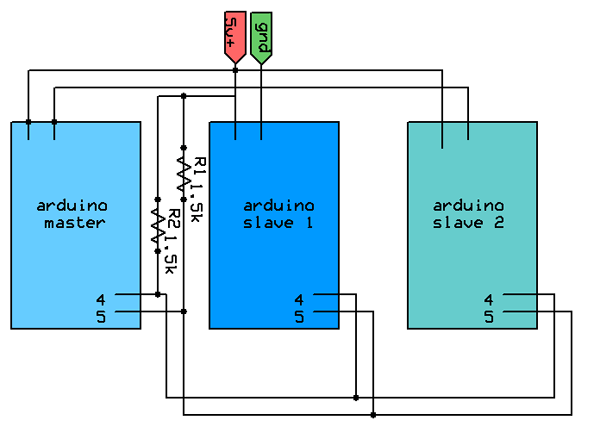
uCHobby has a helpful primer on interfacing electronic components via the handy I2C protocol and Arduino -

I²C uses only two bidirectional open-drain lines, Serial Data (SDA) and Serial Clock (SCL), pulled up with resistors. Typical voltages used are +5 V or +3.3 V although systems with other, higher or lower, voltages are permitted.
[…]
What exactly does the I2C protocol and usage mean to the average robot builder? Well, it can mean a lot of different things,such as easily accessible devices like temperature sensors, accelerometers, and even setting up a small on board network on a robot.
- Introduction to I2C


Makershedsmall
Mkmd1-2
Bare Bones Arduino Board Kit (Unassembled)


Related:

Recent Entries

Comments

Oldest comments listed first.

Posted by: The Oracle on September 17, 2008 at 5:48 AM

Should the master and slave 2 share a ground with slave 1? In the schematic they're not connected.


Posted by: japroach on September 17, 2008 at 11:02 PM

Yeah, thats not the greatest schematic.

But you will notice a lot of bus documentation tends to leave out a ground connection as it is implied.


Posted by: Collin Cunningham on September 17, 2008 at 11:26 PM

implied connections

yups - opamp +/- supply connections are also often left out of schematics. I understand why, but it's still always buged me a bit :\


Posted by: The Oracle on September 18, 2008 at 9:46 AM

Implied, yes, but here the connections are explicitly shown as not connected which has a strong meaning.

Anyway I just wanted to clarify because I wasn't certain, and I'm planning on using I2C for a project soon (and it's an otherwise good read), though it's a bit vauge about how to use the wiring library, the software level explaination was more confusing than helpful. Particulairly what makes the master and slave different, is it just that the slaves "agree" not to speak unless spoken to?


Leave a comment


Subscribe to MAKE!Subscribe to MAKE Magazine!

Subscribe today, save 42% and get web access to MAKE free. MAKE Digital Edition is available only to subscribers.

$34.95 / 1 year
(4 Quarterly Issues)

Subscribe now

How-to videos for Makers and Crafers!


Void your warranty, violate a user agreement, fry a circuit, blow a fuse, poke an eye out. Make: The risk-takers, the doers, the makers of things... Welcome to Make: Online!


CRAFT Maker Shed Maker Faire MAKE television
MAKE: en Español MAKE: Japan

Make: television
Make: television is here! Visit makezine.tv or iTunes to see all the episodes.

Connect with MAKE

Be a MAKE fan on Facebook MAKE on Facebook
Visit our Facebook page and become a fan of MAKE!
MAKE on Twitter MAKE on Twitter
Follow our MAKE tweets!
MAKE Flickr Pool MAKE on Flickr
Join our MAKE Flickr Pool!
    make_tips on Twitter

    MAKE's RSS feed is here.
    Add MAKE to iGoogle - GoogleGoogle.
    How to add MAKE to your RSS reader - Real simple.
    Add MAKE on FriendFeed


    Advertise here with FM.

    Why advertise on MAKE?
    Read what folks are saying about us!

    Click here to advertise on MAKE!

    MAKE wins Treehugger Best of Green Award

    MAKE wins Brit Insurance Design Award

    Subscribe to MAKE Magazine!

    Make: Online authors!

    Gareth Branwyn, Chris Connors (guest author), Collin Cunningham, Marc de Vinck, Peter Horvath (intern), Kip Kay, Goli Mohammadi, John Park, Sean Ragan, Becky Stern, Phillip Torrone

    Suggest a Site!

    Current Podcast

    itunesdl.gif Weekend Project: Fire Piston Make your own fire starter that uses compressed air and burns at 500 degrees! Thanks to Bill Gurstelle for showing us this at Maker Faire. To download The Fire Piston MP4 click here or subscribe in iTunes. Pick up... More...

    Get the Make: Online sent via email
    Enter your email to receive Make: Online each day:


    Subscribe to MAKE Magazine!

    Recent Posts from the Craft: Blog
