












The following article is reprinted from my old personal-tech website, Street Tech. I thought these vibrobots would make perfect family projects for the “Teach Your Family to Solder” MAKEcation. If you have kids too young to solder, you could build a mint-tin vibrobot [PDF] with them (which doesn’t require soldering) and these solar-powered vibrobots with the rest of the makers in your family. – Gareth

In MAKE, Volume 08, I wrote a piece on pummers, a type of solar-powered robotic plant life. I’ve known about pummers for years, but my inspiration for the MAKE article was finding Zach Debord’s gorgeous pummer set on Flickr. Being an artist and designer, Zach understands the value of making miniature robots that are as beautiful as they are functional. Mark Tilden, the “Big God” of BEAM robotics, has a wonderful adage that a human is a way that a robot makes a better robot. One “evolutionary strategy” here is centered on aesthetics. Aesthetics help drive human interest. The pummer piece is a prime example. I saw Zach’s bots, I was wowed by their beautiful designs, and I wanted others to see them. The piece got published, and now, if you search on pummer in the MAKE Flickr pool, you see other people are making them. The robots are replicating themselves.
In the realm of behavior-based robotics, BEAM, bio-mimics, and other bottom-up, bug-brained approaches to robotic design, nearly every conceivable form of motility has been explored. There are bots on wheels, two-, four-, six-, eight-legged bots, bots with whegs (wheel/leg crossbreeds), snakebots, spinnerbots, swimmers, fliers, climbers. You name it. One of the less documented types of robotic motility is found in the vibrobot, a type of robot that gets around by shimmying, shaking, and scooting. It’s not the most graceful or accurate way to explore the world, but it’s very easy to build a vibrobot and they’re really fun (and funny) to watch.

The key to vibrobot movement is a motor (or motors) that employs an unbalanced (aka an “eccentric”) weight. Pager and other motors used to create vibration alerts in consumer electronics use these eccentric weights. As the motor shaft spins, the weight on the shaft, being off-kilter, makes the motor, and therefore the entire pager, vibrate. Hook such a motor up to a little robo-critter with four fixed legs, and when the motor fires and the weight starts spinning, the bot skitters across the floor. That’s all there is to it. Since the legs don’t need to be articulated or driven, there are few mechanical challenges in building a vibrobot. The power circuit is simple too. The simplicity of the mechanics and electronics frees you up to put more effort into making the bots look really cool. It’s no wonder then that, as with pummers, Zach has built an amazing menagerie of vibrobots. We asked him to tells us how he goes about building his wacky little robo-critters.
Here’s a call-out image that details the parts used in a basic solar-powered vibrobot (the Solar Engine circuit is detailed in the diagram below).

As you can see, it’s all fairly simple. This vibrobot uses the FLED (as in “Flashing LED”) version of a Type 1 Voltage-Triggered Solar Engine. This type of common BEAM power circuit was discussed in my “Beginner’s Guide to BEAM” and the “Two BEAMBots” projects in MAKE, Volume 06. This is the same FLED Type 1 SE used in Zach’s Twin-Engine Solarroller we covered previously on Street Tech. In that piece, I quote from a reasonably clear explanation of how a FLED-driven voltage trigger works from well-known BEAM builder Wilf Rigter.
Here is a schematic for the basic FLED SE circuit, taken from Beam-Online.

Parts List
Here’s the list of parts that Zach uses to build a basic single-motor vibrobot. Solarbotics parts numbers are given, but you can also get many of these parts from your own techno-junk collection, from Radio Shack, or other electronics sources.
| Quant | Part | Solarbotics Parts # | Notes |
| Pager Motor | #RPM2 | With weight still attached | |
| 3v Solar Cell | #SC2433 | Any 3v cells, such as the 24mm x 33mm ones SB sells | |
| 4700uF cap | #CP4700uF | N/A | |
| 2N3904 NPN transistors | #TR3904 | N/A | |
| 2N3906 PNP transistors | #TR3906 | N/A | |
| Flashing LEDs | #FLED | N/A | |
| 2.2K-ohm resistors | #R2.2k | N/A | |
| Heat Shrink Tubing | N/A | Radio Shack has an assortment in various sizes. You’ll want tubing all the way up to 2″ dia. | |
| Medium-Size Paper Clip | N/A | N/A | |
| Guitar String | N/A | N/A | |
| Red and Black Hook-Up Wire | N/A | Used to attach solar cell to SE circuit |
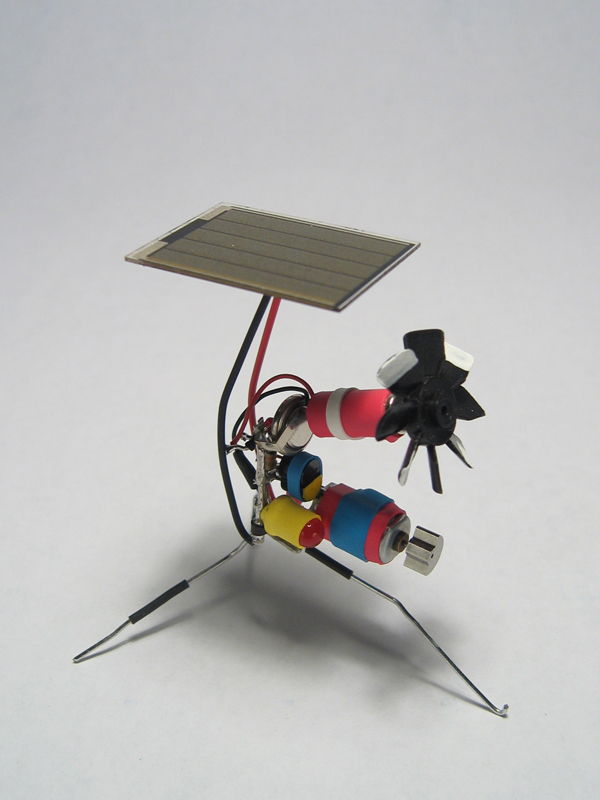
This bot has two pager motors. The first one (on top) has a fan attached to it. This doesn't have much purpose besides offering some kinetic visual interest.
Zach’s Building Tips
Zach offers the following bits of additional bot-builder wisdom for success in creating your own vibrobots:
- The key to a good vibrobot is to keep it as lightweight as possible so the motor can really jiggle it around when it fires.
- Play around with leg placement. Having only a couple of the legs touching the ground at the same time can create some interesting movement patterns.
- Buy a pack of jumbo- and regular-sized paperclips. For the US$2 you spend, you’ll be able to build a whole fleet of robots. I almost exclusively use paperclips and guitar strings for my creations.
- An assortment pack of heat shrink tubing goes a long way. Not only are your bots more interesting-looking, but you can use the tubing in key places to reinforce weak joints. I rarely have two strips of heat shrink on top of each other just for visual appeal.

This dual-motor vibrobot has the ends of paperclips soldered to two pager motors. Each motor is connected to a CdS cell so the more light each "eye" gets, the more the motor on that side fires. It's great to watch it react to a flashlight.

This basic vibrobot uses a polyacene battery instead of a cap (to deliver about .6F of power). The bot gets a decent power burst when it fires. It also has a guitar string "nose" to help keep it away from larger bots.
More:
Vibrobot 1-2-3 (PDF from MAKE, Volume 10)
Let the MAKEcation solder-fest BEGIN!
From the pages of MAKE:

- Pummer! Part robotic plant life, part techno-sculpture, these desktop toys are easy and fun to make. MAKE 08 – page 84. Subscribers–read this article now in your digital edition.

ADVERTISEMENT
Join Make: Community Today



