









Make: Projects

MonoBox Powered Speaker

Build a small powered speaker to amplify your iPod or other headphone music player.

  • By Ross Hershberger
  • Category: Electronics, Music
  • Time Required: 6 hours
  • Difficulty: Difficult
MonoBox Powered Speaker

MonoBox is a small, inexpensive powered speaker that amplifies the output of your headphone music player. It’s little but it’s loud! All the circuit parts are available from RadioShack. The speaker and cabinet are left to your preference.

You’ll learn how to assemble and solder an audio power amplifier using an integrated circuit (IC) chip, and how to choose a speaker and install it in a cabinet with the amplifier.

The core of MonoBox is a compact and efficient audio amplifier based on the LM386 power amp chip. It will run on 200mA of current using power supplies from 6V–15V DC. This gives you the flexibility to power it from a wall adapter, a 9V battery, or a car accessory outlet.

You’re probably thinking, “Sure, but it’s so small. Does it rock?” Fair question. The prototype has been exhaustively tested and it does indeed rock. Maximum volume output is 90dB, and with the added bass boost your socks will be rocked clean off!


MAKE Volume 34: Join the robot uprising! As MAKE's Volume 34 makes clear, there’s never been a better time to delve into robotics, whether you’re a tinkerer or a more serious explorer. With the powerful tools and expertise now available, the next great leap in robot evolution is just as likely to come from your garage as a research lab. The current issue of MAKE will get you started. Explore robot prototyping systems, ride along with the inventors of the OpenROV submersible, and learn how you can 3D-print your own cutting-edge humanoid robot for half the price. Plus, build a coffee-can Arduino robot, a lip balm linear actuator, a smartphone servo controller, and much more

On newsstands now, by subscription, or available in the Maker Shed

Buy now!

Steps

Step #1: Select your cabinet.

Next
MonoBox Powered SpeakerMonoBox Powered SpeakerMonoBox Powered SpeakerMonoBox Powered Speaker
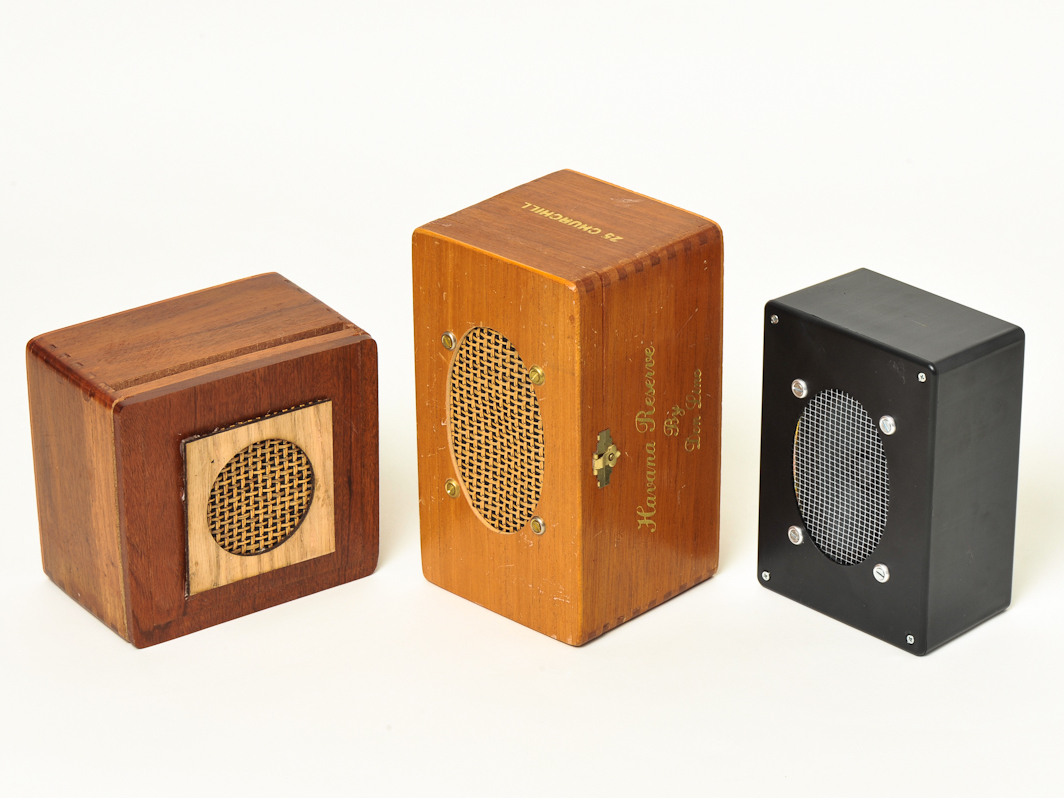
  • There are many options for housing your MonoBox. I've used nice old wooden cigar boxes; you could also use a lunch box or small toolbox. Choose something between 1/8 and 1/4 cubic foot (equal to 6"×6"×6" and 6"×6"×12", respectively). Make sure it's deep enough for your desired speaker, and has one surface suitable to mount your speaker on.
  • NOTE: A box that can be tightly sealed against air leaks will provide the best bass sound.
  • Wood and plastic are good cabinet materials, as they're easy to work. Metal is more challenging. Almost anything relatively rigid can be used. Construct a box from cardboard in any shape you like, and cover it with colored duct tape!
  • RadioShack sells two project boxes that are about the right size. They're made of black ABS plastic that's very easy to work. They measure 7"×5"×3" for model 270-1807 (shown here), or 8"×6"×3" for model 270-1809.

Step #2: Choose your speaker.

Next
MonoBox Powered SpeakerMonoBox Powered SpeakerMonoBox Powered SpeakerMonoBox Powered Speaker
  • The driver (speaker) will determine the sound quality to a great extent. Good-quality drivers are available cheap as manufacturing surplus. Look for a driver at least 3" in size that's described as "full range." This type will reproduce the entire frequency range of sound from one driver.
  • Good online sources of drivers include Parts Express, Madisound, and any websites that sell overstock or surplus parts. Look in the Specials, Closeouts, or Bargains sections for great deals. The driver I used in my prototype cost $0.98 from Parts Express and sounds great.
  • If specifications for the driver are stated, the impedance should be between 6 and 12 ohms (6Ω–12Ω). Resonance frequency should be below 150Hz for good bass. High frequency range should extend to at least 8,000Hz (8kHz). And sensitivity of 90dB or higher will provide better volume output.
  • Drivers repurposed from table radios, computer speakers, etc. are often perfectly acceptable for DIY projects.
  • TIP: You can test a candidate speaker's bass by temporarily mounting it in a cardboard box or in the middle of a panel of cardboard at least 20" square. Connect it to any stereo and play music. The panel, or "test baffle," will separate the front and rear bass waves, allowing you to hear what it will sound like in a finished cabinet.

Step #3: Mark the circuit board.

Next
MonoBox Powered SpeakerMonoBox Powered SpeakerMonoBox Powered Speaker
  • Now you'll build the guts of the MonoBox: the amplifier circuit board. The board has 20 copper traces, each with 5 holes connected together. Eight of these traces will be used for the chip socket. Others will be used for component interconnections and off-board wires.
  • Mark the hole designations on your board before installing components, because it can be difficult to tell the holes apart once some are obstructed. On the soldering side of the board (with the copper traces), use a fine-tipped marker to label the traces, from 1 at the upper right clockwise to 20 at the upper left.
  • Flip the board over to the component side (without the copper), and label the traces from 1 through 20 on this side too. Note that the left/right handedness reverses when you flip the board over.
  • Now label the 5 holes of each trace A through E, with A at the center of the board and E at the outer edge. Thus the inner hole on the trace at the upper left is 1A and the outer hole of the trace at the upper right is 20E.

Step #4: Solder the socket and the caps.

Next
MonoBox Powered SpeakerMonoBox Powered SpeakerMonoBox Powered SpeakerMonoBox Powered Speaker
  • Insert the DIP-8 socket for the amp chip into holes 2A–5A and 19A–16A, orienting the notch in the socket body toward 2A and 19A (up). Flip the board over and solder the socket leads to the traces.
  • NOTE: The electrolytic capacitors are polarized and must be installed in the proper orientation. The negative (–) lead is identified by a vertical band on the housing as shown in the second photo.
  • Insert capacitor C3's (470µF) negative lead into hole 11A and bend its positive lead over to hole 16B. Insert capacitor C4's (100µF) negative lead into hole 20C and bend its positive lead over to hole 17C. Solder and clip the leads.
  • Insert capacitor C2 (0.047µF) into hole 13D and bend other lead to hole 15D. (The ceramic caps aren't polarized, so it doesn't matter which lead is which.) Solder and clip the leads.
  • Capacitor C1 (0.033µF) consists of 0.010µF and 0.022µF capacitors in parallel. Install them together by inserting one lead of each into holes 16C and 14C. Solder and clip the leads.
  • NOTE: If you have a film capacitor with a value of 0.030µF to 0.035µF, you can use that in place of the two in parallel.

Step #5: Add resistors and jumpers.

Next
MonoBox Powered Speaker
  • Insert resistor R3 (10Ω) into holes 15E and 16E. Insert resistor R2 (10K) into holes 1D and 2B. Insert resistor R1 (100Ω) into holes 4B and 5B. Solder and clip leads.
  • TIP: Where a resistor body is longer than the distance between its insertion holes, stand the resistor vertically on one hole and bend the other lead down toward the second hole.
  • Insert a short jumper wire, such as a cut-off lead, from hole 3C to 5C. For all other wires, solid-core insulated wire is recommended for ease of working. 24-gauge telecommunications wire, as from telephone or CAT5 cable, is ideal.
  • Cut a 5cm jumper wire (shown grey), strip 3mm of the ends, and run it from hole 1E to 14E, passing around 19 and 20 as shown.
  • Cut a 5cm jumper wire (shown brown), strip 3mm of the ends, and run it from hole 13E to 5C, passing around 8 and 9 as shown.
  • Cut a 4cm jumper wire (shown orange), strip 3mm of the ends, and run it from hole 20D to 5D, passing around 1 and 2 as shown.

Step #6: Connect the off-board wires.

Next
MonoBox Powered Speaker
  • Wires to reach the power input socket, shown red and black, are soldered to holes 20E (black, –) and 17E (red, +).
  • Wires to reach the signal input socket, shown yellow and green, are soldered to holes 4E (yellow, signal) and 5E (green, ground).
  • Wires for the speaker, shown blue and purple, are soldered to holes 11E (blue, +) and 20A (purple, –).

Step #7: Check your work.

Next
MonoBox Powered Speaker
  • Carefully examine both sides of the board. On the components side, check the connection holes against the assembly instructions.
  • On the solder side, use a magnifier to look for missed solder joints, cold joints, or accidental solder shorts between traces. This is a tiny board and problems are easily overlooked by the naked eye.
  • If you think you see a solder bridge between traces, run a knife point between the traces to scrape it away.

Step #8: Add the amp chip.

Next
MonoBox Powered Speaker
  • Finally, carefully plug the LM386 amp chip into the socket. Orientation is as follows: with the board held with the socket in the upper part as shown, the 'dot' on top of the chip will be at the upper left.
  • That's it! You've just built an amplifier.

Step #9: Cut and drill the cabinet.

Next
MonoBox Powered SpeakerMonoBox Powered SpeakerMonoBox Powered SpeakerMonoBox Powered Speaker
  • Trace the shape of the speaker on paper using a pen or crayon. Cut out your tracing and use it as a template to mark the box surface for cutting.
  • Place the speaker on the box and mark its mounting holes with a Sharpie.
  • How you cut the box will depend on the material. For my wooden cabinet, I roughed out the speaker hole with a 50mm × 1mm cutoff disk on a Dremel, then finished it to size with a 2" sanding drum followed by 100-grit sandpaper.
  • In a rear corner, locate and cut a 10mm hole for the power socket and a 6mm hole for the audio signal input jack. My box was so thick I needed to cut a little relief inside so the power jack would reach through.
  • TIP: Place the jacks in a corner so the cords will be low if the box is placed either vertically or horizontally.
  • Near the jacks, place the circuit board on the cabinet surface and mark through 2 of its corner holes to place mounting holes. For #6 screws, drill the holes with a 1/8" bit for a snug fit.

Step #10: Install the amp and jacks.

Next
MonoBox Powered SpeakerMonoBox Powered SpeakerMonoBox Powered SpeakerMonoBox Powered Speaker
  • Solder the audio ground wire (green) to the outer tab of the audio input socket. Solder the audio signal wire (yellow) to both the left and right signal tabs of the jack.
  • The power jack mounts from the outside. Thread the black/red power wires through the power jack's nut and washer, then pass the wires out through the power jack hole from inside the cabinet. Solder the black wire to the outer power jack tab and the red wire to the inner tab.
  • The circuit board requires standoffs to give it about 1" of clearance from the cabinet. I used sections of ¼" plastic water tubing. Pass two #6-32 × 1½" screws through from the outside, and slip the standoffs onto them inside. Slide the circuit board onto the screws and install the nuts.
  • Put the audio jack through the 6mm hole and nut it on the outside. Pull the power jack through its hole and nut it on the inside.

Step #11: Make the speaker grille.

Next
MonoBox Powered SpeakerMonoBox Powered SpeakerMonoBox Powered SpeakerMonoBox Powered Speaker
  • The speaker needs an acoustically transparent fabric grille to protect it. You can use a variety of materials including speaker grille cloth, cane material, metal screen, or anything else that will pass sound through.
  • My speaker needed a gasket to keep the cone from hitting the grille. I recommend sheet cork. Use the speaker frame as a template for the outside of the gasket, and the cabinet speaker hole as a template for the gasket inside. Drill screw holes in the gasket also.
  • For a gasket, you can also use pasteboard, foamcore, thin wood, plastic, or other stiff foams. Soft foams and corrugated cardboard won't work.

Step #12: Install the speaker.

Next
MonoBox Powered SpeakerMonoBox Powered SpeakerMonoBox Powered Speaker
  • I used #6-32 flat-head brass screws in finishing washers from the hardware store because that looks fancy with my wood box. Again, use a 1/8" drill bit for #6-32 screws.
  • Solder the blue (+) speaker wire to the + terminal of the speaker and the purple (–) wire to the - terminal.
  • For the best bass performance, seal any gaps or air leaks in the box with hot glue or caulk then fill the box with a moderate density of Dacron pillow stuffing. Fiberglass insulation works well too, but it's an irritant and should be handled carefully.
  • If you've chosen a box that opens and you don't want to permanently seal it, you can apply felt or adhesive foam to the edge of the lid rim to stop air leakage.
  • Done! Cool! Now we just have to talk about power and input signal and you're ready to play your MonoBox.

Step #13: Power up your MonoBox.

Next
MonoBox Powered SpeakerMonoBox Powered SpeakerMonoBox Powered Speaker
  • Your power source needs at least 300mA of current capacity. Voltage as low as 6V works for driving 4Ω speakers, but 12V is best for 16Ω speakers, so 9V is a good compromise. RadioShack's Enercell 9V/300mA AC adapter is ideal. Install the type N power plug with the center (tip) positive. Now you can plug your MonoBox into wall power.
  • To build a battery adapter, solder the red (+) lead of a 9V battery snap connector to the center contact of a size N coaxial DC power plug. Solder the black (–) lead to the outer contact. Attach the battery to the back of the cabinet with the 9V battery holder.
  • TIP: After screwing the power plug's body together, you can fill it with hot glue to secure the wires in place.
  • To use a car or boat's 12V power system, make an adapter for the accessory "cigarette lighter" socket. Again, use a size N coax power plug and solder the negative lead to the outer contact, positive lead to inner contact.
  • Other DC power supplies can be used the same way, but make sure the voltage does not exceed 15V DC.
  • The MonoBox has no power switch. To turn it off, unplug the power from the back. Leaving a battery plugged in will drain it overnight even if no music is playing.

Step #14: Hook up the music.

Next
MonoBox Powered SpeakerMonoBox Powered SpeakerMonoBox Powered Speaker
  • Audio signal input will depend on your music player. Purchase or make a signal cable suitable for your player with a 1/8" stereo plug on one end to plug into MonoBox. Most smartphones and MP3 players accept a 1/8" plug in their headphone jack.
  • Plug in the power source and the audio signal cable. Set your music player's volume to minimum, start the player, and increase the volume until you hear sound from MonoBox.
  • MonoBox has no volume control, so use your music player's volume control. Also use any tone controls or equalization on the music player to adjust the tone of the sound to your liking.

Step #15: How your amplifier works.

MonoBox Powered Speaker
  • The amplifier circuit is designed to be fed by a headphone output, so the input impedance set by R1 is a relatively low 100Ω. This helps load down the source and eliminate noise. Use a 10KΩ resistor for R1 if you'll drive your MonoBox from a line-level source like a home stereo CD player.
  • Most small speakers need bass boost. Components R2 and C1 provide a high-pass feedback loop to boost bass by reducing frequencies above 200Hz. If the sound is too bassy with your speaker, R2/C1 can be eliminated or disconnected.
  • For the best bass in a 4Ω speaker, C3 can be increased to 1,000µF. In a 16Ω speaker, C3 can be 470µF or reduced to 250µF without losing bass performance.
  • R1 provides a load for the signal source and ground reference for the chip input. C4 decouples and filters the power supply. R3/C2 is a Zobel network to ensure a low impedance load at high frequencies and to damp oscillations.
  • Pin 5 is the audio output of the IC chip. This pin has a DC voltage of 4.5V added to the audio signal. Capacitor C3 blocks the DC voltage from reaching the speaker and passes only the audio signal.

Conclusion

Going Further

What if you really want stereo? Make 2 MonoBoxes! In each, connect only one channel (left or right) of the input jack directly to the amplifier circuit board, and use a SPST switch to connect or disconnect the other channel, so each box has its own mono (or 1-channel) selector switch.

Set both boxes to 1-channel, then use a stereo headphone splitter to connect both MonoBoxes to your music player.

65 Responses to MonoBox Powered Speaker

  1. Peter123 on said:

    To power the speaker you could also have a solar panel on top so during the day you can switch from battery power to solar power by just adding a switch.

  2. fontmark on said:

    Found the diagram in the PDF.

  3. Nick Normal on said:

    hi saulx350z, the diagram is one Page 2 of the project: http://makeprojects.com/Project/MonoBox+Powered+Speaker/2396/2 – it’s Step 15, or, if you can’t see that for some reason, here is the image: http://guide-images.makeprojects.org/igi/X3WB2Tny1O2xSlQb.large – hope this is what you were looking for.

  4. Ross Hershberger on said:

    Volume: I measured peaks 90dbs at 1 meter distance before distortion set in. This was with an 8 Ohm speaker of mid/high efficiency. Not enough to throw a disco party but way above a typical computer speaker. I recommend a wall-wart power supply rather than a 9V battery for extended high volumes. Uses a lot of current.

  5. Ross Hershberger on said:

    It depends on the speaker. A larger speaker may have reduced high frequency response unless it’s designed as a full-range driver. If you’re unsure I’d say build the amp circuit alone and try it with that speaker mounted on cardboard as described in the article. if you don’t like it you can change to a different speaker for the final assembly.

  6. Ross Hershberger on said:

    I wish I could give a full answer. Do you mean it plays at low levels but stops completely when the volume is turned up?

  7. Ross Hershberger on said:

    Note that a number of the Radio Shack parts like the circuit board and some of the resistors come 2 or more to a pack so you won’t have to duplicate the whole list when making 2 amps.

  8. ambrosehone on said:

    Also, I guess I would also need to adapt the power for Australian sockets.

  9. ambrosehone on said:

    *Complete Battery Overkill*
    Also, I guess I would also need to adapt the power for Australian sockets. Hmm…..

  10. Ross Hershberger on said:

    Stereo is covered at the end of the article. The LM386 amp chip has only one channel of amplification. The easiest way to go stereo is to build two of them. You have to make a small modification to the circuit at the input jack because the stock mono circuit connects right and left together. You would want one built with only the right channel connected and the other built with the left connected. Option: install a switch at the jack so you could switch to mono operation by connecting in the other unused channel.

  11. tripsofjacks on said:

    I went into radio shack today and they had no problem helping me find all the items on the list. I’m going to build this over the next couple days. I found this on flipboard and thought it sounded too awesome not to try… I have never done a project like this, but your instructions appear well done. I will post on the outcome when I am done. Thanks for sharing this project.

  12. tripsofjacks on said:

    My project is a sucsess, my amp is working well, and is really cool!!! Much thanks to the author for sharing these awesome and easy to follow plans!!!

  13. Ross Hershberger on said:

    Note from the author here. I’m abruptly out of the country for work and have unreliable internet. Apologies for the lack of replies. I will read all responses and answer as soon as I’ve sorted out certain industrial laser issues and made my back north of the border. Thanks. Ross Hershberger

  14. Michael Lewis on said:

    Looks like I’m going to answer my own posting: The author clearly intended to indicate by use of a triangular symbol that the LM 386 is the IC in the circuit. However, by adding the + and – signs to the input leads, he created the symbol of an op amp. This is a mistake that only a person with limited electronic knowledge would notice, since the square wave output of an op amp makes it clearly unusable as an audio amplifier.

  15. Scott W Vincent on said:

    Hauke, you need a log (audio) pot for audio signals. I don’t what exactly would be best for this circuit, but it seems that values between 10k and 50k are most common these days, though I’ve seen some amps that use 100k pots.

  16. Scott W Vincent on said:

    That is very nice! I like how the lion artwork surrounds the speaker, looks great!

  17. Tim – Vocals are normally in the centre of a stereo recording. This means that they are present in exact same amounts on the left and right channels. Instruments tend to be placed more on one side than the other.

    When making a mono speaker like this, the left and right signals get summed together. However, if at some stage during the construction, the polarity of either the left or the right channels is inverted, then anything in the centre, like the vocals, will get lost. This is because the vocals are now present as exact opposite signals on the left and right, and perfectly cancel out when summed.

    This phenomenon doesn’t affect the instrumentation as they tend to be in different amounts on the left and right, and so do not cancel out when one side is subtracted from the other.

    I can’t help you with regards the specifics of the circuit (I haven’t looked in detail at it yet), but a good place to start would be to look at the wiring of sockets and jacks – have you swapped a shield and a tip, for example?

  18. Arnoldas Gribas on said:

    setup would be the same
    yes it would be capable powering a bit more powerful driver, but don’t expect much because its only 1W

  19. Arnoldas Gribas on said:

    very nicely done :)
    distortion is boosted by increasing gain?

  20. i made a stereo version because i had enough parts left: https://www.dropbox.com/s/fqv7p5zpogspep2/lm386-stereo.jpg

    • Is there a schematic for the stero circui? I built the mono curcuit and am building a second but I dont know how to connect the two for stereo.

      • build two circuits. stereo line in has ground, right and left channel. use ground for both and left for one circuit and right for the other. the original version has left and right together in one circuit.

        • Awesome. Worked great. My only issue is that the volume is half as loud in one speaker. I swapped speakers ad determined it is the circuit. Any immediate ideas. I’m assuming it is my craftsmanship to blame. I’ll probably have to make a new circuit.

      • Havok on said:

        Really want to build a stereo Do this :
        Make 2 monoboxes In each, connect only one channel (left or right) of the input jack directly to the amplifier circuit board, and use a SPST switch to connect or disconnect the other channel, so each box has its own mono (or 1-channel) selector switch.

        Set both boxes to 1-channel, then use a stereo headphone splitter to connect both MonoBoxes to your music player.
        (I got this from the down of the article!)

  21. Scott W Vincent on said:

    Very nice! The pot is a great addition. I’m thinking of doing another some day with an option for line in level sources with a volume control.

  22. Scott W Vincent on said:

    That’s interesting – thanks for sharing. I might try the 1 watt chip on my next build.

  23. Ross Hershberger on said:

    Check your email inbox.

  24. Jakub Czarnecki on said:

    I would say check that there is no short and make sure the chip is not in upside down

  25. Ross Hershberger on said:

    I’ve checked with Parts Express and they have the $0.98 oval speaker tha twe used in some of the prototypes still in stock.

  26. Ross Hershberger on said:

    Capacitor voltages are not critical, as long as they are at least 50% higher than the power supply that you’re using.

  27. Ross Hershberger on said:

    The bass boost in the circuit can exceed the voltage swing capability of the amplifier. If you get distortion on bassy music consider using the EQ on your music player to turn the bass down. Or refer to the article and disable/remove the bass boost parts.

  28. Ross Hershberger on said:

    We found in testing that some portable headphone players delivered a lot of noise when loaded with a high impedance. They need a lot of current drawn to shunt out and damp the high frequency hash in particular. That’s why the 100 Ohm input resistor. Terminating the headphone output with a higher resistance will result in higher noise on some source devices.

  29. Ross Hershberger on said:

    Builder’s issues solved via email. He built it right, but had the worng IC chip. See his further comments below.

  30. Alec Spicer on said:

    I soldered, drilled the box, and the whole nine yards. I finally hooked up the power to see if it works but there is no audio. All I’m getting is a little bit of noise when I hook the power chord into the power jack. Ask me questions about the problem so I could give more detail and so I can get this awesome project to work.

  31. praveen on said:

    I think its very helpful for me .

  32. I want to have the option of my box being powered by a battery(in the box) and a wall plug. I know i’ve seen the instructuions here somewhere. can someone point me in the right direction?

  33. Phil O on said:

    Awesome guide! I’m using a Nightfire Electronics LM386 kit I bought for $10 from Amazon. Saved me a little trouble assembling all the components. One comment on the circuit: looks like you bridged the input signals without resistors. I’ve read that this causes distortion and can even damage the source, because the two signals are essentially fighting to set “their” voltage on the same wire. It’s a good idea to run each signal through a 10k resistor before connecting them. But it seems that lots of people are following these instructions with no complaints, so maybe it’s not that important?

  34. i did it. Awesome. powerful

  35. gary green on said:

    Where Can I add a pot so I can have volume control?

  36. jeromymurphy on said:

    I had a great time building this. Great project for an amateur. My radio shack was sold out of the 8 pin connector so I used a 14 pin instead. Same cost, I just had to be careful what I plugged into and soldered. I used a speaker driver scavenged from an old Samsung surround sound. The speaker was flush with the face of the box so I used the metal lid from a canning jar with fabric glued in to finish it out.

  37. Is it necessary to use an ic pc board? Reply!

  38. bonsai171 on said:

    Can this be modified to make a preamp and drive an amp instead? How hard would that be?

  39. Hi in the schematic there are two triangles pointing down so, i am a newbie to this and schematics. so can you help me?

  40. Thanks bonsai171, But there is only one positive connection.

  41. Havok on said:

    Hey, Ross there are 5 caps in the photos but in schematic there are 4 caps. But how?

  42. Havok on said:

    Thanks, Pete that helped a lot.

  43. SkipF on said:

    I found an electronic crossover PCB via ebay in china…And I’m using a pair
    of aluminum 2 way speakers; each speaker has it’s own amp. Power is a bit
    funky. 2 18650 lithium batteries for the power, plus 2 14500 LBatteries for the
    negative supply of the Xover.

  44. Havok on said:

    Is it necessary to use an ic pc board?

  45. SkipF on said:

    No… but it’s a whole lot easier. I used to build prototype cameras @Polaroid. Once we
    got BOARDS, they worked a lot better than the WWrap or P2Point vector boards we originally
    modeled the circuits with. 2 boards for $13.00…

  46. Tommy on said:

    This is a cool project. I actually used a circuit similar to this to build a guitar amplifier into a cigar box (same workhorse LM386 and all). Only difference is that you would use a pot to control the gain. For any guitar players out there, you can very easily modify this exact same build (just sub out a couple of parts) to get a sweet-looking portable guitar amp. The following link shows the schematic (though it’s not my site or my work).

    https://lh3.googleusercontent.com/-X8sUApMtOhM/UNEB4o8zwOI/AAAAAAAAArY/oQHvUsvDA2U/w500/amp-diagram.png

  47. Doug on said:

    I used a pvc pipe to house everything! its great

  48. Can i use a 4 0hm 100watt speaker driver? Will it run on a 9 volt battery ?

Leave a Reply

Fill in your details below or click an icon to log in:

WordPress.com Logo

You are commenting using your WordPress.com account. Log Out / Change )

Twitter picture

You are commenting using your Twitter account. Log Out / Change )

Facebook photo

You are commenting using your Facebook account. Log Out / Change )

Connecting to %s

%d bloggers like this: