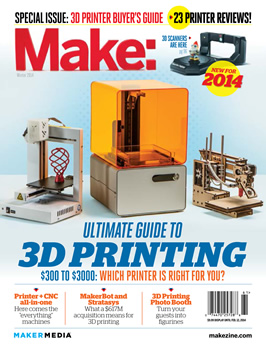
Reviews
Afinia H-Series
Easy to use, with feature-rich software and impressive print quality.
Categories: Workshop 3D Printing
Bukobot 8
Nimble, expandable, and smartly innovative, the Bukobots will make a lot of new RepRap fans.
Categories: Workshop 3D Printing
Cube
With wi-fi printing and OK print quality, the reliable, easty-to-use Cube makes a move for the mainstream.
Categories: Workshop 3D Printing
Felix 1.0
Quiet and capable, the Felix is a true DIY printer – bring your toolbox and your patience.
Categories: Workshop 3D Printing
LulzBot AO-100
Your basic MendalMax, with a better manual and accessories.
Categories: Workshop 3D Printing
MakerGear M2
Steel-solid, big volume, prints great — with tweaking, the M2 could be best-in-class.
Categories: Workshop 3D Printing
MendelMaxPro
This professional-grade printer is a cut above its kin, but is it ready for your living room?
Categories: Workshop 3D Printing
Printrbot Jr.
Surprisingly good prints from the cheapest, smallest, most portable 3D printer yet.
Categories: Workshop 3D Printing
Printrbot LC
For the tech-savvy, Printrbot offers expandability, speed and acceptable prints at a reasonable price.
Categories: Workshop 3D Printing
Replicator 2
No longer open source, the Replicator 2 nevertheless impresses with major upgrades.
Categories: Workshop 3D Printing
SeeMeCNC H1.1
The most do-it-yourself machine we tested — how well it prints is up to you.
Categories: Workshop 3D Printing
Solidoodle 2
An undisputed value leader — and a hint of good things to come.
Categories: Workshop 3D Printing
Type A Series 1
An affordable, accurate printer with a huge build area and lots of potential.
Categories: Workshop 3D Printing
Ultimaker
With the fastest, finest prints of any DIY printer, the Ultimaker rewards the patient tinkerer.
Categories: Workshop 3D Printing
Up Mini
For $899 the Up Mini is impressive, and if you’re willing to futz you’ll likely find it a solid beginner machine.
Categories: 3D Printing Workshop


This issue is quite comprehensive. The Buyer’s Guide actually contains the most comprehensive review of consumer / hobby 3D printers that I’ve ever seen! Good work!
However, The 4-5/5 score for Ultimaker “Print Quality” is unexpectedly low (I think a “5″ is in order and consistent with the “5″ for “Accuracy”), but perhaps 4-5 score is due to a problem with the reviewers. Sometimes reviewers expect “magic” or “mind reading” products to replace intelligent user interaction:
“The snake and owl came out great, but the torture test had lots of stringing, mainly due to Cura’s default settings not having retraction turned on.”
There are advantageous and disadvantageous to using retraction. That’s the nature of settings; you can’t have them both (all) ways in the same universe at the same time!
It would have been better if the machines were used by pro-users to really compair the best the printers can output, compairing default settings isn’t much of a comparison but helps a bit in choosing which printer I would buy.
It would have been nice to have big pictures of the torture test print, they only have a tiny picture of each in the summery and the clear ones are very hard to see.
Im crying FOUL here…..I’ve got a bit of a problem with the midrange standouts – (and i’ve only concentrated the midgrange 3d printers because thats my area of intrest in a purchase)
According to the test results, the MAKERGEAR M2 equals or out scores the TYPE A SERIES 1 in all areas but reliability (for which there is no explinationas to why it got a 1 point reduction in that area in the review) the overall scores of the M2 are higher then the A1
. …. this is either and obvious mistake in stating the standouts. or clear bias.,
Notably, all the price point class winners happen to all be sold at makershed where as the point leader in class is not sold my makershed. This makes it seem more like bias for things makershed sells.
There are ovbious drawbacks in flexability on the A1,
its inability to print abs because it has no heated bed, calling it “optimised for PLA” nice way to discribe a missing feature. honestly sounds more like ther marketing department wrote that.
the A1 also is lacking an sd slot, but again seemed not to play into a final recomedation
The A1′s lack fo documentation on the website were M2 has documentation of the website, but they scored the same for documentation. thats another odd observation.
i know i am concsentrating on a comparison to the M2 which to my eyes seems to be the best in class according to the reviews and the scoring, but the drawbacks of the A1 seem to have been glossed over, glorified as features, or down right ignored.
The review also has no reall easy way to compare the printers side by side, showing sores on one page, ore ven totaling of the scores would have been helpful. Seems also practily, there should ahve been a catagory for veratility.
a table of scores, and featrue comparisons would have been ideal.
I have to commend this effort for having enough information to then research and do a final decision. my problem is with the conclusions not matching the scoring and some of the biased writing.
.
There is bias as each tester has experience in 3D printers, any scores would be effected by what printers they have used or own. It’s also not clear if the score came from a single tester or a group averaged out (but a lack of decimal point hints at only one tester).
One thing that should be noted was that the M2 was reviewed by its owner because MAKE couldn’t get their hands on a machine for testing. People tend to view things they already own more favorably and this bias will come out in a review. Personally, I think it more likely that the M2 review is biased than the A1 based purely on the review process.
I’m not sure how you can say that.
lets take a practical look at the advantages each has over the other
type a series 1 chasses is made of plywood wood and the m2 stainless steel, a1 has no heated bed, limiting its abilities in printing abs, m2 can has a heated bed and can print both pla and abs well. a1 can print down to 100 microns and the m2 can print to 20 microns. a1 doesn’t have documentation of their website – web site is sparse, m2 does have docs. a1 can not print without a pc, m2 can as it has an sd card slot. a1 print volume 729 cu in. and the m2 640 cu in, a1 build speed is 80mm/s and m2 is 150mm/s., price at the time of writing was within 100 dollars of each other fully assembled.
m2 out classes the a1 in all respects except for total print volume and then only slightly. maybe i missed something. if so point it out. print quality speaks for itself, and with tweaking i am sure both printers could do better.
now I am no m2 fan boy. I actually own a makerbot replicator dual extruder at the moment which I am perfectly happy with. but lets call a spade a spade ok. shame on the editors not to point these things out properly.
Here is a useful link http://www.kaptonsource.com/botsquare.htm
Our wifi printer that isn’t working, and I need to find a new one. Thanks for sharing this.
looks really nice! I actually made a little hypercube sculpture up for print over at http://www.shapeways.com/model/887892
I never thought possible though at a 3D printer ever would print ceramics! got some REALLY nice appetizer spoons at http://www.shapeways.com/model/888574
It would be so much better if you put prices next to the descriptions.
I really can’t wait for an updated guide on 3D printing like this in the next couple of years, It’ll be nice to look at an issue like this once a year and see the differences and advances. Kinda like when you look back at specs and prices for a PC in the last 10-20 years and see we were paying A LOT more for A LOT less.
I can,t wait for an updated guide on on 3D printing has to do with medical – Dental lab,s
3D printers are the future, technology moves very quickly, in a short time we will have 3d printers to fabricate objects and even food.
in the future we will do everything with this type of printers, from objects up to food.excellent post,thanks for sharing.
not is what will be the future, but everything happens by doing more comfortable life to people, thanks to technology
why would people be buying the stuff in 3D for ?
// What's Trending
Raspberry Pi Design Contest
Ten Tips for Adhesive Tape
Seventeen Sneaky Secret Hides
I Have a (Puzzling) Dream
10 Things to Connect to Your Raspberry Pi
Maker Faire: Day Two
47 Raspberry Pi Projects to Inspire Your Next Build
Maker Pro: How Much Should I Charge?
// What's Shared
A better way to slice a pumpkin
DIY Nerf Darts
100 Dollar Store Organization Ideas for Craft Rooms and Beyond
In the Maker Shed: Minty Boost USB Charger
Mad’s Mouse House
Lace Princess Crowns
I Have a (Puzzling) Dream
Play the Rings of a Tree Trunk Like a Record
// Most Commented
DIY Hacks & How To’s: Get Emergency Power from a Phone Line
Resin Casting: Going from CAD to Engineering-Grade Plastic Parts
Ten Tips for Screws and Screwdrivers
Ten Tips for Better Measurement
Is it a Hackerspace, Makerspace, TechShop, or FabLab?
Makers on TV: Big Brain Theory
Arduino Announces New Wireless Linux Board
Pitches with Prototypes: Solar Tracker
Trending Topics
Get our Newsletters
About Maker Media
Subscribe
to MAKE!
Get the print and digital versions when you subscribe